- Free plan available
- No credit card required
Customer support that knows when to hand off
Chatsy is an AI customer support platform. It answers from your help content and sends unresolved conversations to your team with the transcript attached.
Built by the teams behind AgencyPro, Agiled, Morphed and 20 more products.
01 · Answered
Answers repeat questions
02 · Handed off
Hands off to a person
03 · Improved
Shows what's missing
Live chat
Your team picks up where the agent stops, with the whole conversation in view.
A queue for handoffs
Handed-off chats wait under Waiting until a teammate claims one.
The whole conversation
The AI transcript sits above your reply, so nobody asks twice.
Who you're talking to
Visitor email, the agent they used, and why it was escalated.
Three ways to finish
Resolve it, return it to the AI agent, or release it to the queue.
Also in the workspace
Email tickets turn forwarded support email into tickets you can assign.
Knowledge base publishes help articles your agent also answers from.
Analytics on conversations, ratings, and first reply time.
Feedback shows which answers visitors rated down.
Models chosen per agent in its settings.
The widget styled with your color and welcome message.
How it works
From help docs to a live widget.
The dashboard keeps a setup checklist like this one. Test answers before you publish the widget.
Create an agentSetup checklist
Chatsy AI · 3 of 5 steps done
Add knowledge (done)
Your website, files, and help articles.
Test the answers (done)
Ask real customer questions and check the source behind each answer.
Turn on Escalate to Human (done)
The agent hands off when it can't help or a customer asks for a person.
Invite a teammate (pending)
Teammates reply to handed-off chats from Live chat.
Publish the widget (to do)
Style the widget, copy one embed script, and paste it into your site.
After launch: Questions that ended in a thumbs-down or a handoff are listed under Knowledge. Add a source that covers each one.
Demo workspace with test data
The handoff, captured in a local workspace.
These screens come from Chatsy running locally with a test workspace and sample help content we wrote. There are no customers in it. No AI model key was configured, so the AI reply failed and the visitor asked for a person; everything after that is the real handoff.
See the setup stepsDemo workspace with test data · captured November 12, 2026
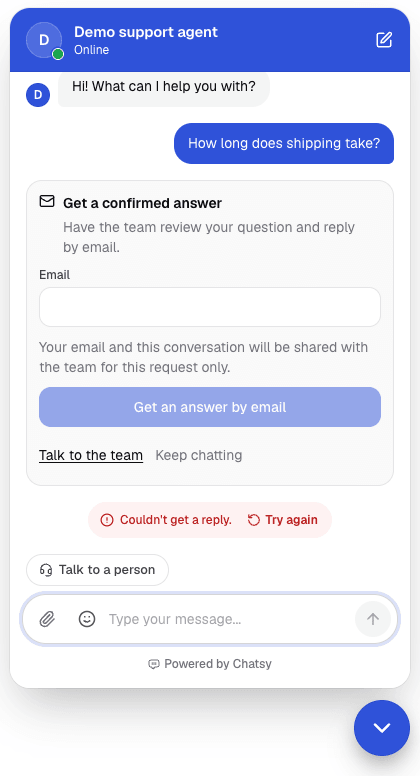
1. The visitor asks for a personNo AI reply could be generated in this local test, so the widget offered Talk to a person. 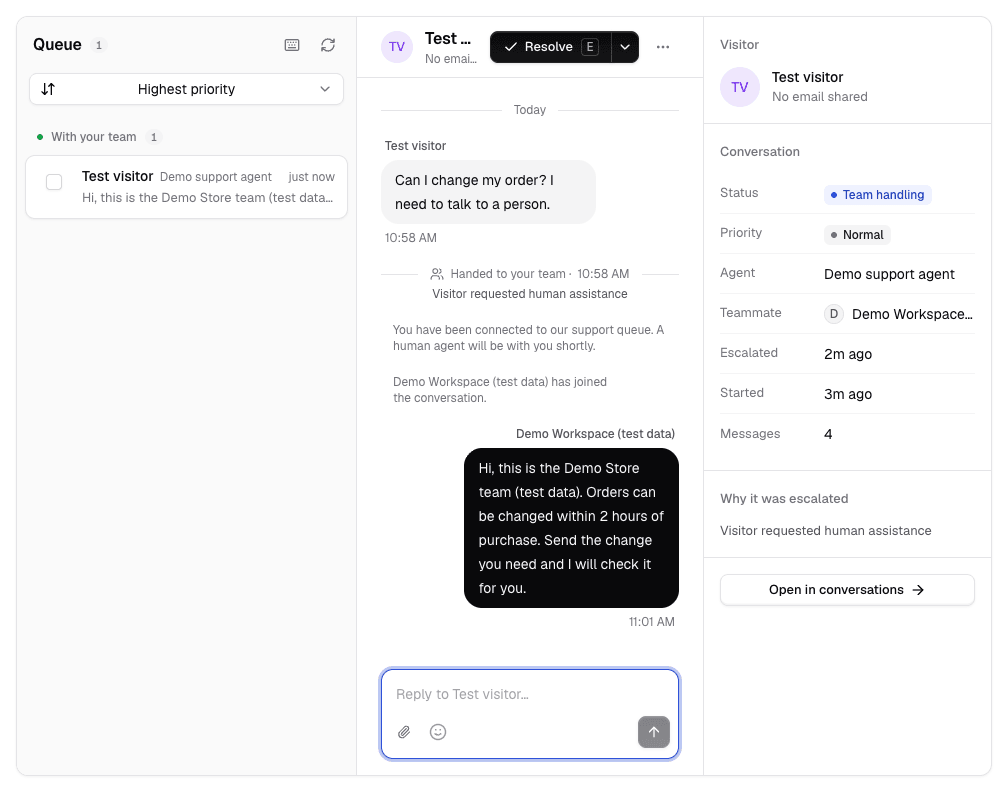
2. A teammate claims it and repliesThe conversation waited in Live chat until a teammate claimed it and wrote back. 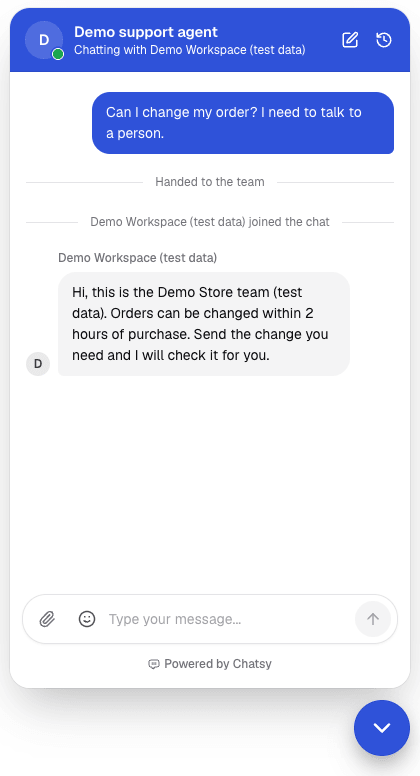
3. The visitor sees the replyThe reply arrives in the same chat window, after a note that the team joined.
Test data only: not a customer, quote or result. The modules shown: Live chat, Shared inbox, Knowledge base.
Integrations
Connections, with an honest status.
What you can set up today, what agents can do with it, and what is still planned.
View integrations| Connection | Dashboard setup | Agent actions |
|---|---|---|
| Calendly | Available | Not available yetAgent actions remain disabled while end-to-end testing is incomplete. |
| Pipedrive | Available | |
| Klaviyo | Available | |
| Slack | Available | |
| Stripe | Available | |
| Mailchimp | Available | |
| Agent actions: Not available yetAgent actions remain disabled while end-to-end testing is incomplete. | ||
| 5 more planned | Shopify, Cal.com, HubSpot, Salesforce, Zapier | |
Security
Security, in plain terms.
Where a connected account's credentials go, who on your team can open what, and what we don't offer yet.
- OAuth tokens and API keys are encrypted with AES-256-GCM before they are stored.
- Connection routes decrypt credentials on the server for provider requests; credentials are not exposed to the browser.
- Workspace and role checks decide which protected dashboard data each team member can open.
Not offered yet
- SOC 2 Type II
- Signed HIPAA BAA
- Single sign-on (SSO)
Contact us before buying if your team requires any of these. Contact our team
Questions before you start.
Still have a question? Contact our team
What does the free plan include?