Shared inbox and email tickets
A shared inbox that turns support email into tickets
Keep your support address and forward it to Chatsy. Each email becomes a numbered ticket your team can assign, prioritize, tag and answer, in the same dashboard as your AI chat and live chat. It is a lightweight inbox for small teams, not a full help desk. Included from the Hobby plan at $40 a month.
Chats and tickets in one dashboard
The zipper broke after a week. Can someone take a look?
Damage in the first 30 days is covered, so I’ll pass this to the team with our conversation attached.
Moved to live chat with the transcript
Internal note · Delivered 9 days ago, so the 30-day policy covers it.
Hi, I’m Sam from the team. I can see the whole conversation, so let’s sort this out.
What it does
Shared inbox in Chatsy
Your address, forwarded
Verify your support address with a 6-digit code, then forward it to the mailbox address Chatsy gives you.
Numbered tickets
Every email becomes ticket #1, #2 and so on, with Open, Pending, Resolved, Closed and Spam statuses.
One owner per ticket
Assign a teammate, set Low to Urgent priority and add tags. Mailboxes can auto-assign or require an owner.
Saved replies
Reusable answers with placeholders for the customer’s name and the ticket number.
AI drafts from your sources
With the AI drafts module, start a reply from a draft based on your agent’s knowledge, then edit and send.
Chat to ticket
Agents get a Create Support Ticket tool, so a chat that needs follow-up becomes a ticket in the right mailbox.
- 01
Create a mailbox
Open Inbox in the dashboard. Chatsy gives the mailbox its own forwarding address.
- 02
Verify your address
Enter the 6-digit code Chatsy sends to your support address. It expires after 15 minutes.
- 03
Forward the address
Set your email provider to forward support mail to the Chatsy address. Keep a copy while you test.
- 04
Send a test email
Email your support address from another account and confirm it arrives as a new ticket.
Email tickets
What happens to each support email
Chatsy does not read your mailbox. Your provider forwards each message to the mailbox’s own Chatsy address, and Chatsy decides whether it is a reply to an open ticket or a new one.
Connect your support email- 01
The email reaches your Chatsy address
Every mailbox gets its own forwarding address. Mail is only accepted after you verify your support address with the 6-digit code; until then the mailbox stays inactive.
- 02
Chatsy checks whether it is a reply
It looks for a ticket tag such as [#42] in the subject, then the email’s reply headers, then the same subject from the same sender on a ticket active in the last 14 days.
- 03
Replies join the existing ticket
The quoted history is trimmed so only the new message shows. A Closed, Resolved or Pending ticket reopens as Open when the customer writes back.
- 04
New emails become numbered tickets
Anything else becomes the next ticket number in that mailbox, with attachments up to 10 MB. If the mailbox auto-assigns, the ticket goes to the mailbox owner.
- 05
An optional acknowledgement goes out
With auto-reply on, the customer gets a message with their ticket number, or the AI draft if you turn on AI auto-reply for a mailbox linked to an agent. Mailing lists and other automated mail never get an auto-reply.
- 06
Your team is told and replies
A connected Slack channel can get a new-ticket alert, and an AI draft is prepared when drafts are on. Your reply keeps the [#42] tag in the subject, so the customer’s answer lands back in the same ticket.
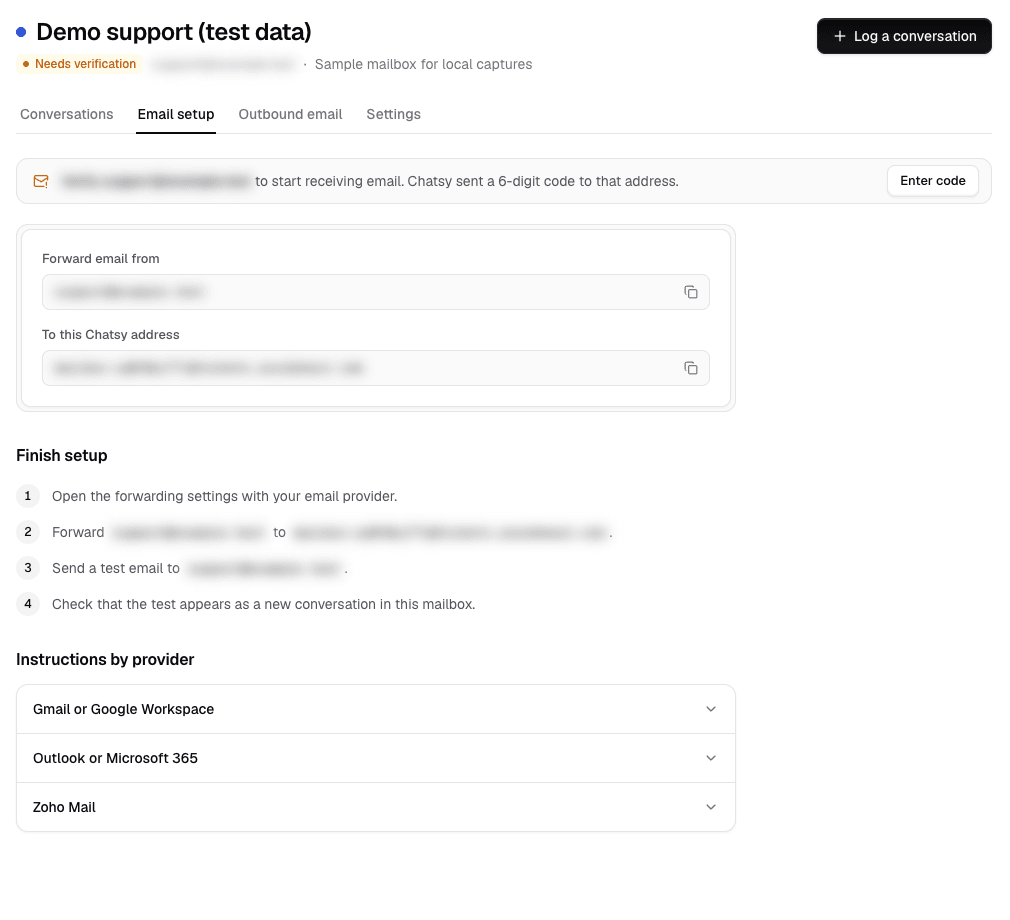
1. Connect the addressThe Email setup tab shows the address to forward from and the Chatsy address to forward to. Addresses are blurred. Local test workspace with test data, captured November 12, 2026. 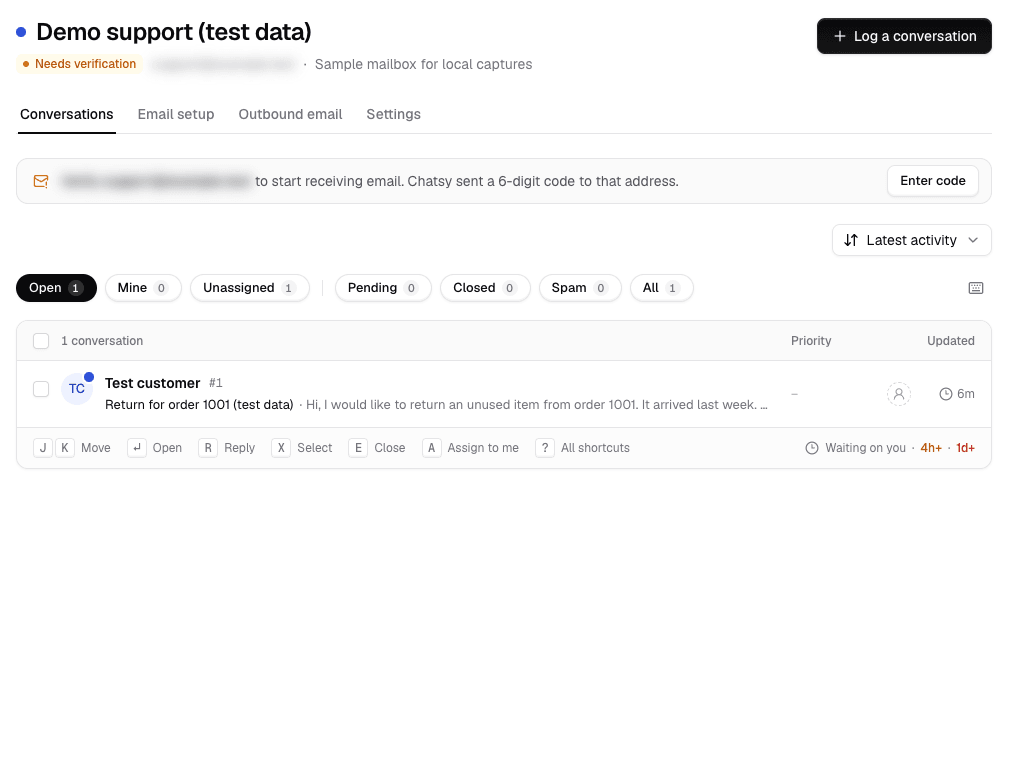
2. Requests become ticketsThe mailbox list with one logged sample request. Local test workspace with test data, captured November 12, 2026. 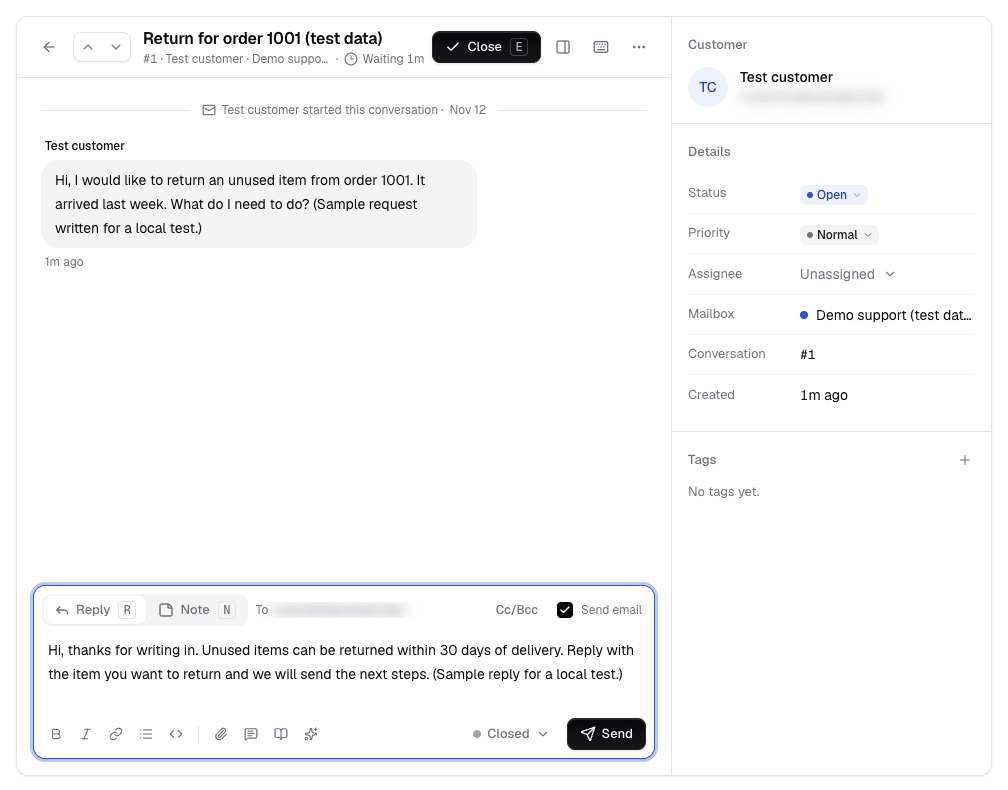
3. Reply from the ticketA reply composed on ticket #1. Email sending was not configured in this local test, so it was not sent. Local test workspace with test data, captured November 12, 2026.
Each copy of an email is handled once: if your provider delivers the same message twice, the second copy is ignored. Chatsy does not send your team an email for each new ticket; use the dashboard or a Slack alert.
Plans
Mailboxes and seats on each plan
Each mailbox is one support address. Seats include the workspace owner, so 1-seat plans have no room for teammates. Compare all limits on the pricing page.
| Plan | Inbox and tickets | Mailboxes | Team seats | AI drafts |
|---|---|---|---|---|
| Free ($0/mo) | 1 | |||
| Hobby ($40/mo) | 1 | 1 | ||
| Standard ($150/mo) | 2 | 3 | ||
| Pro ($500/mo) | 5 | 5 | ||
| Enterprise (quote) | 10 | 10 |
Where it stops
Where a full help desk does more
- Email is the only ticket channel. Phone, social and messaging apps do not create tickets.
- There are no SLA timers, escalation rules, skills-based routing or round-robin assignment.
- There is no customer portal where customers sign in to see their tickets.
- Reports cover the AI agent, not ticket volume, agent performance or CSAT.
- Replies go out through Chatsy’s email service, or your own Postmark account. There is no separate custom sending-domain setup.
- Chatsy cannot import old tickets from another help desk.
Not a fit if
- You run a team of more than 10 agents on one queue.
- You need SLAs, approval workflows or contractual reporting on tickets.
- You must keep years of ticket history from your current tool in one place.
- You need ticketing on the Free plan: it starts on Hobby.
FAQ
Questions before you turn it on
Read next
Guides for this module
- Connect your support emailVerification, forwarding and testing, step by step.
- Set up a support email addressChoosing the address, forwarding and routing before any tool.
- Live chat with handoffThe chat side of the same dashboard.
- Best help desk softwareFull help desks, for teams that need more than this.
- Customer support solutionHow chat, email and the agent fit one support workflow.
- PricingMailboxes, seats and credits on every plan.
One place for support email and chat.
Start on the Free plan to build your AI agent, then add the inbox on Hobby when you connect your support address.
Free plan available. No credit card required.